UniFiController synology letsjpg

Let’s Encrypt certificate on Ubiquiti Unifi Controller installed on Synology Docker

This is a short article describing how to install an SSL Let’s Encrypt certificate on Ubiquiti Unifi Controller that is installed on Synology using Docker.

The article assumes that Docker and Unifi Controller are already installed on your Synology NAS and that the Let’s Encrypt certificate is already added in Synology’s Control Panel. Also that the certificate to be used is the one set as default, although this can be easily modified in the script.

Install Java8 because the terminal commands used for generating and importing the certificate in Unifi Controller’s keystore are part of that package.
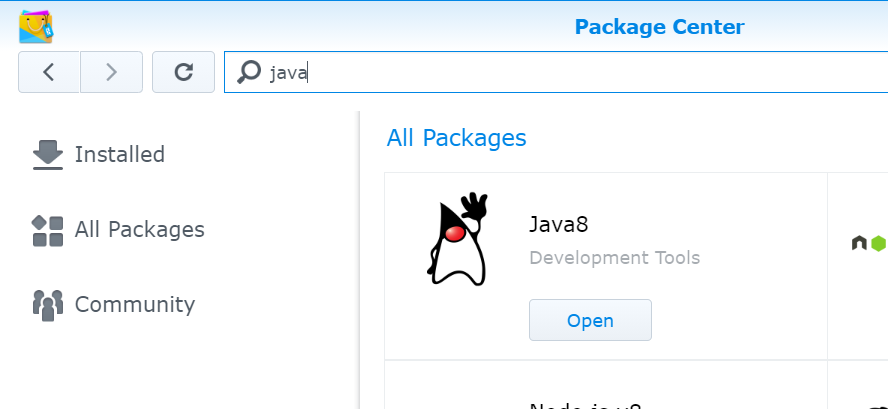
java8

Navigate to Task Scheduler and create a scheduled task with root privilege to run once a day that will check if the certificate has been updated within the last 24 hours and then import it in the keystore.
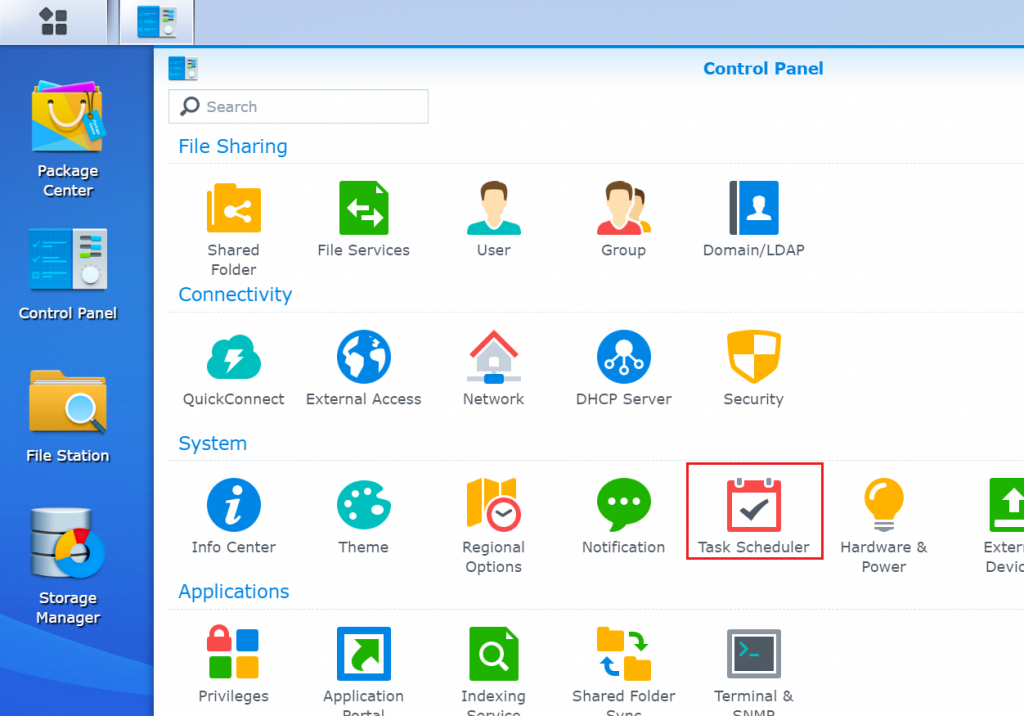
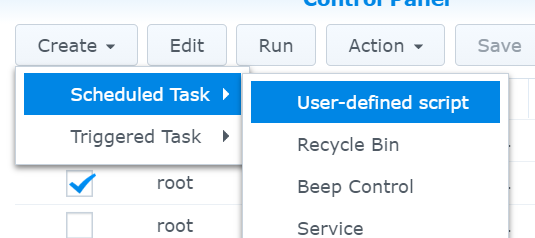
task scheduler
task

Copy and Paste below code in Run Command textbox.

#!/bin/bash
#Should be scheduled to run once a day

echo "Go to the default certificate folder"
sudo su
cd /usr/syno/etc/certificate/_archive/`cat /usr/syno/etc/certificate/_archive/DEFAULT`

#Check if the certificate has been updated within the last 24 hours
if [ $(find . -mtime -1 -type f -name cert.pem) ];then
	echo "Creating certificate"
	openssl pkcs12 -export -inkey privkey.pem -in fullchain.pem -out fullchain.p12 -name unifi -password pass:unifi
	
	echo "Importing certificate"
	keytool -importkeystore -deststorepass aircontrolenterprise -destkeypass aircontrolenterprise -destkeystore /volume1/docker/Unifi-Controller/data/keystore -srckeystore fullchain.p12 -srcstoretype PKCS12 -srcstorepass unifi -alias unifi -noprompt
	
	rm -f fullchain.p12
	
	echo "Restarting Unifi-Controller"
	docker restart Unifi-Controller
else
	echo "Certificate not updated recently"
fi

Now all you have to do is wait for the script to run and do its magic!

Similar Posts

  • Packet Sniffing with WireShark

    Download and install Wireshark from http://www.wireshark.org/. Launch the application. Go to Capture -> Options. Select the interface for the wireless network card and tick Capture packets in promiscuous mode. Then press Start. MSN conversation hack: Wireshark will start capturing packets that flow around. Among others we notice at the protocol field the MSNMS (Microsoft Network…

  • Transfer Calendar from iCloud to Microsoft Outlook

    Using MacOSX open Calendar application. In case you are already logged in to iCloud the entries should appear. Go File->Export->Export and save the exported file anywhere on your mac. This will create a file with an extension .ics. Locate the file using Finder and right click on it. Select Open With, then Microsoft Outlook. Done!…

  • Student-Markers problem

    The aim of this project was to use C posix threads. This is something like the dining philosophers problem but a bit more advanced. A student must find two free markers to mark him and then release them after finishing. More details and souce are found in the attachment. [Source]

  • PuTTY SSH Tunneling

    This post explains how PuTTy SSH Tunneling can be easily used to bypass firewall rules blocking ports. Let’s say that we have the following setup where only communication via port 22 is allowed between two hosts: Step 1: Open profile and load server’s profile Step 2: Navigate to Connection->SSH->Tunnels and add new port as the…

  • New URL Shortener

    I was planning for quite some time now to register the domain tsent.as. A few days ago this really happened. In order not to leave the domain sitting without any use, I decided to create a very simple URL shortener interface written in PHP. Visit http://tsent.as/ and shorten as many domains as you like. It’s…

Leave a Reply

Your email address will not be published. Required fields are marked *

This site uses Akismet to reduce spam. Learn how your comment data is processed.