
WordPress plugin update Connection Information
A common error that you can come across while updating your WordPress plugins is the one in the screenshot where WordPress is requesting to provide the Connection Credentials in order to be able to update.
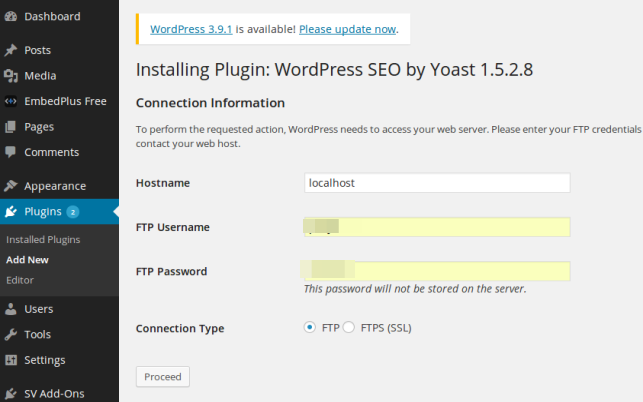
For me personally this happened when I moved my websites to a new server and the permissions of the files changed. WordPress is checking the ownership of the files while updating and they must match some specific criteria described in various posts in the web.
There is no need to go into much detail on what is causing the problem since there is a very simple solution which worked on all my websites. Just add below line at the bottom of wp-config.php and you are done!
define('FS_METHOD','direct');



Genius! Thank you. Such a simple solution to a problem that’s been doing my head in for hours.
Thanks for this quick solution! I’m gonna post this solution on my blog too. I just moved my websites to a new faster VPS and having a hard time with this issue.
Thank you so much!!
—
Clint
Most excellent. Worked for me too. And I learned a ton. Had to go look that up and learned so much more about the wp-config.php file.
I’m just in the process of moving 10 sites between servers and in the middle, I started locking down security a bit better.
This little gem helped me keep the security in place but update the software too.
Thanks
Cool beans! It worked!
I was trying different methods since Bitnami has a tricky way of setting up your Amazon Web Server and the FTP is by means of a private key, so it is very tough trying to setup an ftp credentials. I read other blogs and tried chown method for the user running the php process and didnt work.
This one totally nailed it! Thanks for this!
Thank you!! This was perfect.
Thankyou Brother.
Thank U!!
Thanks man. You are genius. Keep your tips flowing
It works 100%. Thanks!!
Thank you!
Tried everything before such as giving any kind of permissions and this simply directive worked for me.
BOOM !!! You are the MAN!!!
This solved my Import WordPress issue
Import WordPress Sorry, there has been an error. The uploaded file could not be moved to wp-content/uploads
I’ve tried allsorts and this worked immediately, goof work…
Wow! it really worked.
I was trying to fix this issue from 2 days, tried running SSH commands and added FTP credential to wp-config file but nothing worked.
But your 1 line solution worked perfectly.
Is there any security concern adding this file? Please let me know.
Thank you
Didnt work for me.
Installation Failed : Could not create directory
Likewise brian. Could not create directory.
There are no installation instructions in the post, just to edit a file. What exactly were you guys doing and it could not create a directory?
I manually installed WordPress on my Synology NAS. And i can’t get this to work. I’ve updated folder ownerships and included this in my wp-config.php. I didn’t have the popup but i got this error ‘Could not fully remove plugin xxx.php’ [i’m trying to remove a plugin to test for this issue]
works perfect buddy thanks ^^
where link this plugin