
Install Windows 10 from iso on old MacBook running El Capitan
This article explains how to install Windows 10 on an old MacBook running El Capitan. Apple made sure to make our lives difficult but installation is still doable.
1
Download the Windows 10 .iso file from your preferred location (MSDN, torrentz etc) and place the .iso file on the desktop.
2
Insert a USB drive in one of the Mac’s ports. This USB drive will be formatted so make sure that all its contents are backed up.
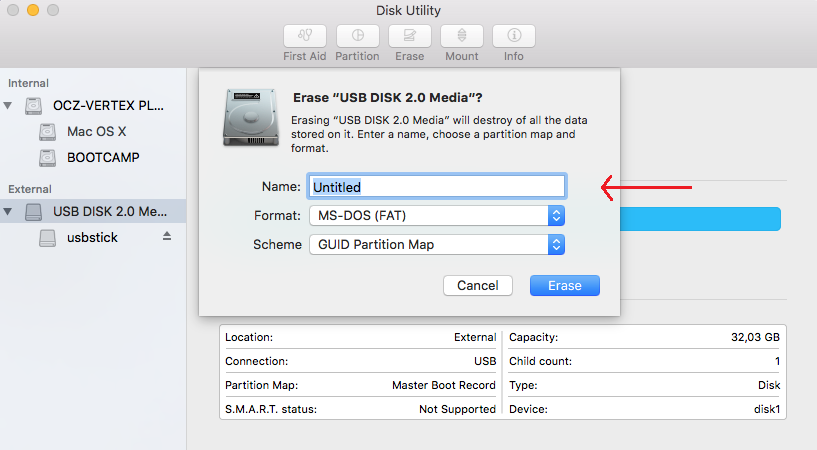
Launch the Disk Utility, select the USB drive from the list, then press Erase on the top of the window and make sure MS-DOS (FAT) format is selected. Then click Erase button to start the process.
3
Once formatting is complete, launch Boot Camp assistant and click Continue. Make sure all three options are selected as per below screenshot.
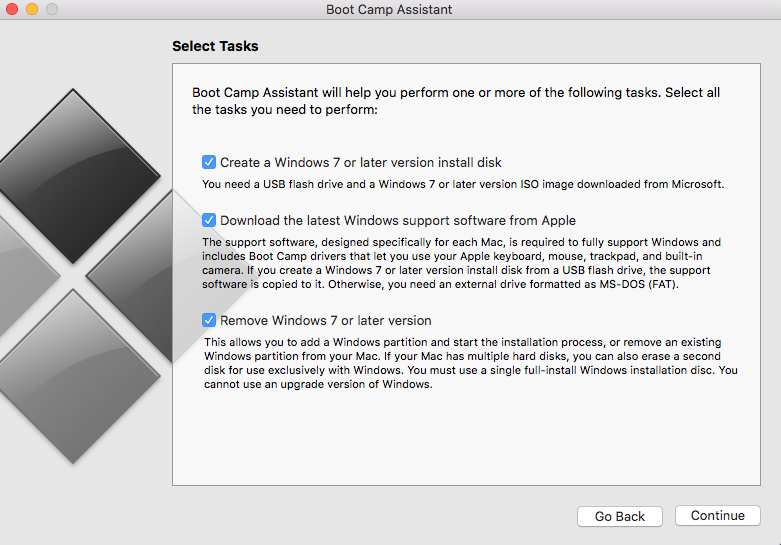
If the first option “Create a Windows 7 or later version install disk” is missing, please follow the article of the link to make it appears before continuing the process on this article.
Then click Continue again. If the .iso file is placed on the Desktop and the USB drive is FAT formatted, Boot Camp Assistant will automatically detect them as per screenshot below.
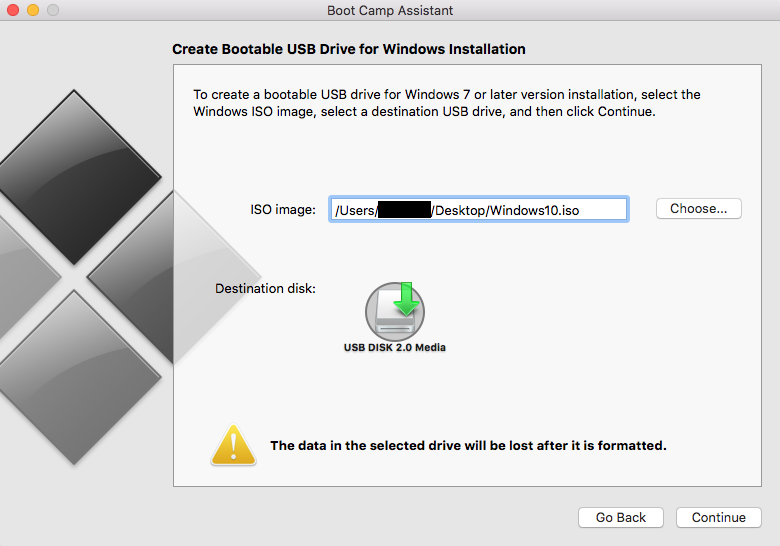
Click Continue again to manage the size of the Windows partition and then the installation process will initiate!
4 (Bonus)
Once Windows 10 are installed, you will notice some key mac features like right click of the Track Pad are not working.
In order to install Boot Camp drivers, please follow the article “Boot Camp x64 is unsupported on this computer model“.

Hello. I try to install windows 7,8.1, 10 on external ssd drive connected via usb port to my 15″ MacBook Pro 2014 and cant select ssd during installation process, it just say that – “You cannot install Windows on a USB flash drive from Setup”.
I replace my ssd inside old pc instal 10 there and again connected it to macBook and boot from ssd. It works fine.
But i do not have anymore that old pc. And next time windows 10 crash will be last 🙂
Is there way to install windows to external ssd without using other pc?
What version mac was this on? Did your driver install fix the multitouch issue? I have a Macbook pro 3,1 and the track gestures/right click are not functioning. I used 4.0.4033 for mine. Is there a way to set up the functions or is this just one thing we must live without?
I have a Macbook Pro 5,5 and used Boot Camp 5.0.5033. Right click is functioning fine now.
I tried this process and I am getting the on EFI systems Windows can only be installed to GPT disks.
I tried this on Win8 and Win10, same error. I even tried to reinstall Win7, but it won’t let me (and I have all legit copies). I even tried disk but terminal is saying it doesn’t recognize the command.
I have a MBP 8,3 from Late 2011.
Any help?
Hello!
Everything go well until the macbook 5,1 restar!!! on the screen show up a message saying: enter a usb boot or something like that, something is worng with the usb, i try with diferent copies of windows10 but the same error, why can i do? i need windows10 ASAP
Is this possible to do on me macbookpro3,1?
I only have a 4GB usb drive